Smart Discount Manager for Prestashop – Advanced Category & Brand Discounts

Smart Discount Manager for Prestashop – Advanced Category & Brand Discounts

35,00  without VAT

🏷️

Smart Discount Manager: The easiest, fastest and safest solution for bulk price and discount management by category or brand in your e-shop.

The Smart Discount Manager is a tool for every PrestaShop e-shop owner who wants to manage the prices and discounts of their products in bulk, quickly and with complete security. Forget the time-consuming process of changing prices per product – now you can make changes in entire categories or manufacturers (brands) with just one click!

⚡ Top Ease of Use

The module's philosophy is based on speed. It is designed so that even the most novice administrator can perform complex pricing changes in seconds:

🏷️ Easy to Add Discounts

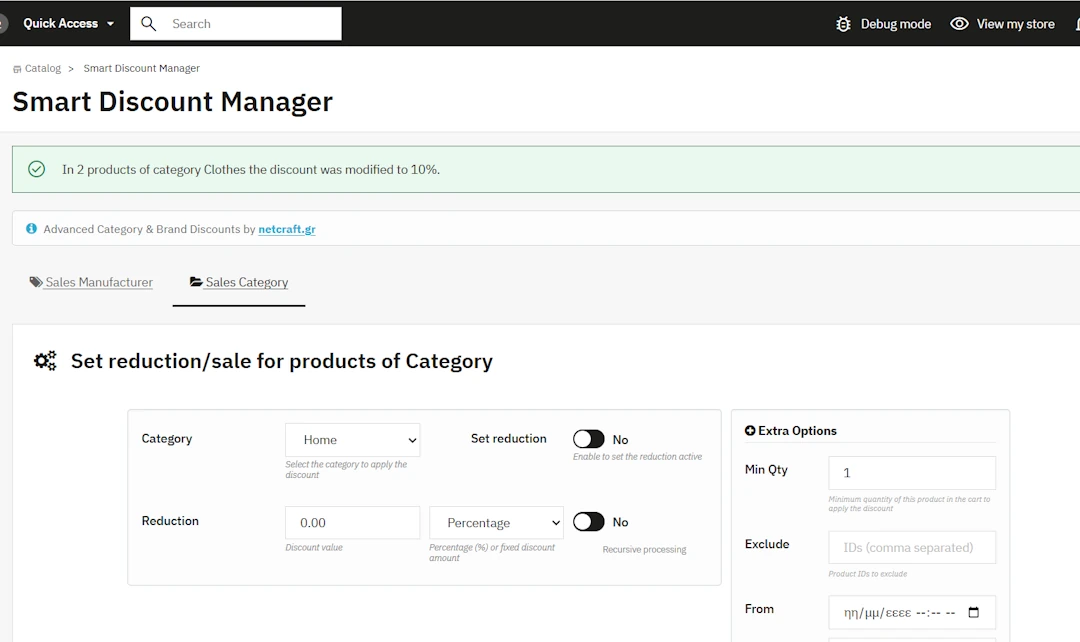
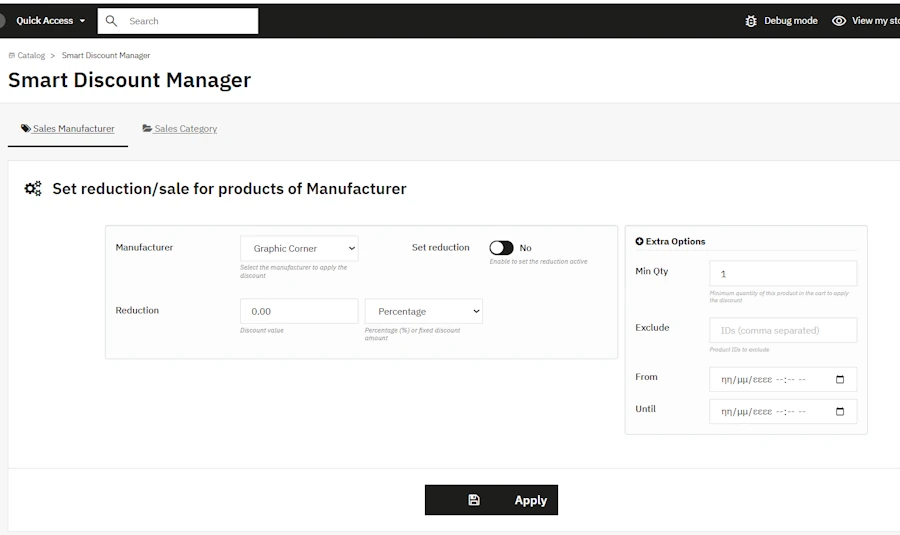
Select Category or Manufacturer, set the percentage (%) or fixed discount amount, optionally select start/end dates, and click «Apply». The module will automatically generate the special prices for all relevant products.

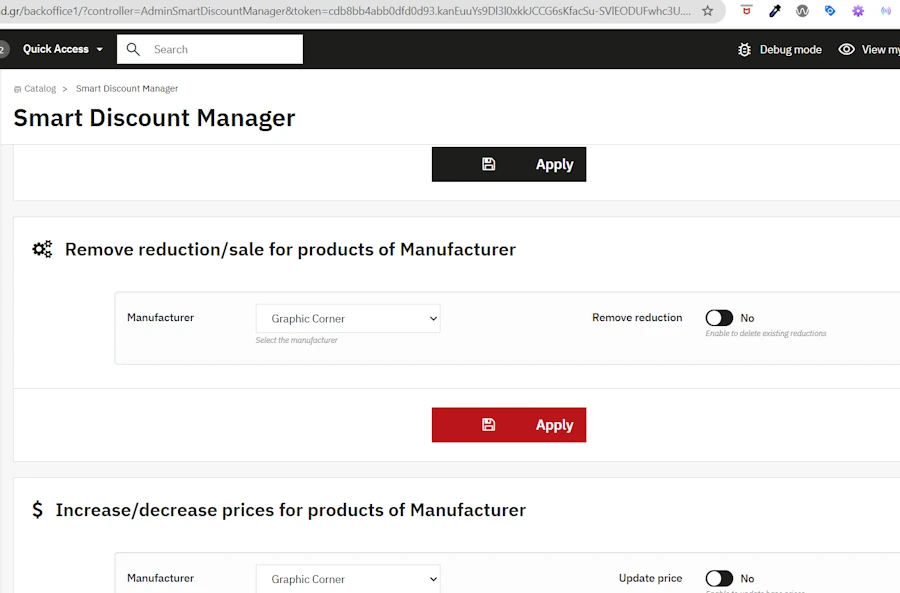
❌ Remove Discounts with 1 Click

Want to stop a promotion? No need to search for products one by one. Select the manufacturer or category, activate "Remove discount" and click save. All special prices will be deleted instantly!

📈 Change Initial (Base) Price

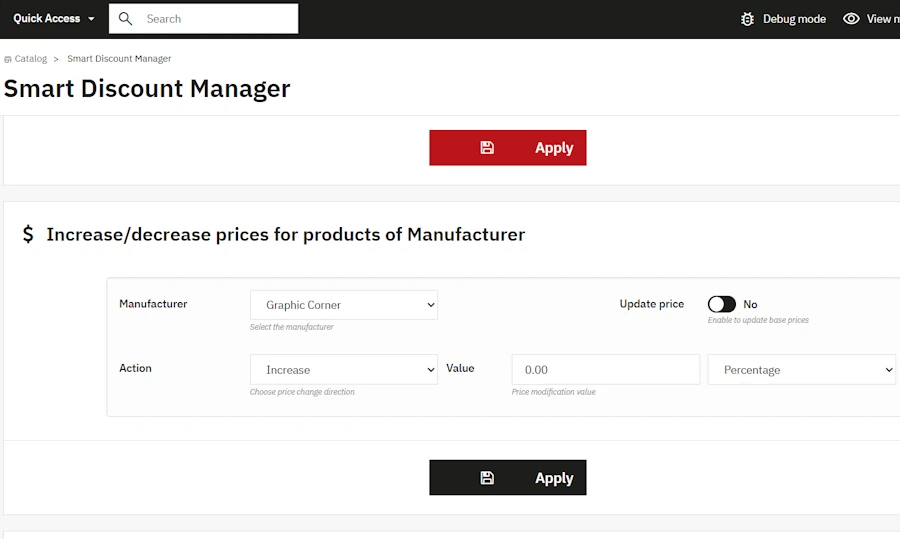
Increase or decrease the base prices of a manufacturer's products due to price increases. The change is made either as a percentage (%) or as a fixed amount, directly updating the product prices in your database.

All Module Features

1. Mass Application of Discounts by Manufacturer (Brand)

• Ability: Setting a special price (at a percentage of % or a fixed amount) for all products belonging to a specific brand.
• How do you use it: Select the manufacturer from the menu, enter the discount price and click “Apply”. The module automatically creates special prices for all products of the brand instantly.

2. Bulk Application of Discounts by Category

• Ability: Setting a special price (discount) for all products placed in a specific category.
• How do you use it: You select the desired category, set the discount and apply it with one click. Ideal for offer campaigns on specific types of products.

3. Recursive Processing of Subcategories (Recursive Processing)

• Ability: Automatic extension of the discount to all subcategories under the selected category.
• How do you use it: Activate the “Recursive Processing” option with the switch (Yes/No). The module applies the discount to the entire category tree without having to select them one by one.

4. Excluding Specific Products (Exclude IDs)

• Ability: Protection of selected products from the bulk discount you are about to apply.
• How do you use it: Enter the product IDs you want to exclude (separated by commas, e.g. 12, 18, 143) in the “Exclude” field. The module will normally apply the discount to the entire category or brand, but will skip these specific products.

5. Minimum Quantity Rule

• Ability: Activate the discount in the cart only if the customer purchases a minimum quantity of the specific product.
• How do you use it: Set the number in the “Min Qty” field (e.g. 2). The discount will apply in the e-shop only when the user selects 2 or more pieces of the product.

6. Time Programming of Offers (Date Range Picker)

• Ability: Scheduling the start and end of sales on specific dates and times.
• How do you use it: Use the “From” and “Until” fields to set dates. The discounts will automatically appear on your e-shop at launch and will be deactivated once the expiration time has passed, without any action required on your part.

7. Bulk Discount Removal with 1 Click

• Ability: Complete and instant deletion of all active specific prices from products of a brand or category.
• How do you use it: Select the category or manufacturer, turn the “Remove reduction” switch to “Yes”, and press “Apply”. The module deletes all special prices immediately.

8. Bulk Increase/Decrease of Initial (Base) Price

• Ability: Permanent change in the base price (initial price before taxes) of products of a specific brand.
• How do you use it: Select the manufacturer, select “Increase” or “Decrease”, specify whether the change will be in percentage or amount, and click “Apply”. Ideal for bulk supplier price increases.

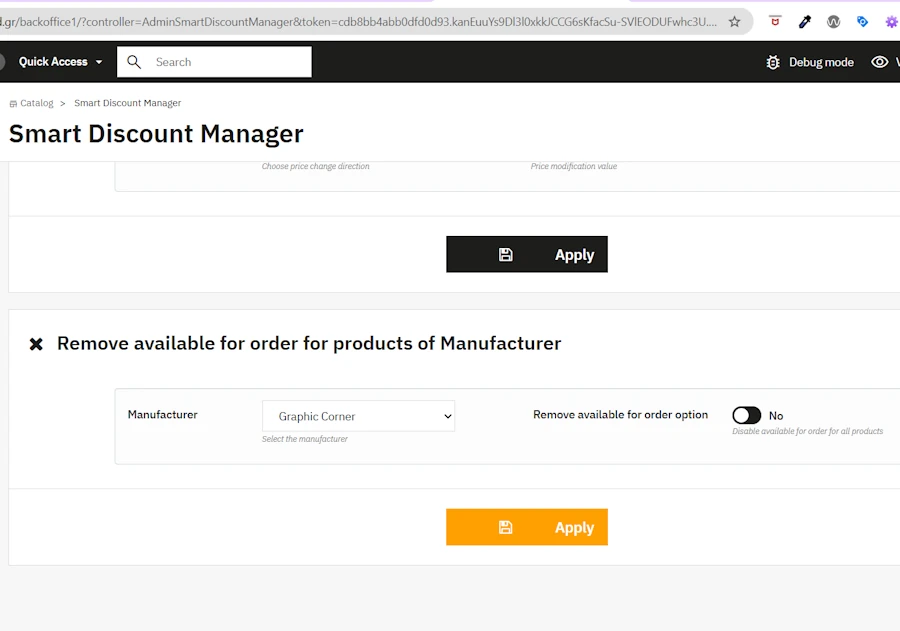
9. Mass Deactivation of Order Availability (Remove Available for Order)

• Ability: Deactivating the purchase option (“Available for order”) for all products of a brand.
• How do you use it: Select the manufacturer and click “Apply”. Very useful for products from suppliers that have been permanently removed, so that they remain in the e-shop for SEO reasons (Google searches) but cannot be added to the cart.

10. Smart Bypass Validation

• Ability: Seamless mass price updates without errors due to missing data in older products.
• How do you use it: It works automatically in the background. The module bypasses strict field checks (EAN13, UPC, ISBN, etc.) during bulk storage, so that the process is not interrupted if a product has an invalid code.

⚙️ Technical Specifications & Quality

PrestaShop compatibilityPrestaShop 1.7.x, 8.x, up to the latest version 9.1
Quality Control100% Compatible and tested by PrestaShop Validator
Technology / DesignDevelopment based on official PrestaShop standards, fully responsive UI with Bootstrap
Speed & PerformanceOptimized SQL queries for fast execution even in databases with thousands of products
LicenseOpen source license 3.0

📦 Installation in 3 Steps

  1. Upload the module folder to the path /modules/smartdiscountmanager/ of your e-shop.
  2. Go to the PrestaShop Back Office, find the module in the list and click Installation.
  3. The module will automatically appear in the menu Catalog by name Smart Discount Manager, ready to use!

🌐 Live Demo / Try the Module

See the module in operation in our live demo environment and try out all its features:

• Backoffice URL: https://xch.gr/backoffice1/
• Username (Email): demo@demo.com
• Password: Ddemo1#ab
• Tabs: Smart Discount Manager Tab in Catalog
Compatible with PrestaShop 1.7.x to 9.1 PrestaShop Validator Approved 1-Click Apply & Remove

Reviews

There are no reviews yet.

Be the first to review “Smart Discount Manager for Prestashop– Advanced Category & Brand Discounts”

Your email address will not be published. Required fields are marked *